Build better. Earn faster. With modern tech– AI, code/no-code & beyond.
How to Buy, Manage, and Migrate a Domain Name in 2025: The Beginner’s DNS Guide
Last Updated:2025-12-05
Category:Web Development
Reading Time:12
Article-type:Standard
Introduction
The internet is like one long wire to which billions of devices are connected. This includes the device you are using right now, and also the server providing you this webpage. All these devices (or endpoints)— computers, smartphones, smart TVs, web servers etc. — have a unique identifier called an IP address (Internet Protocol address) that allows them to find each other.
Memorising those IP addresses for every website would be impractical. This is where the Domain Name System or DNS comes into play.
When you create a website, one of the first things you do is register your website's name (like newgenstack.com) with a domain registrar. A descriptive name is much easier to remember than arbitrary numbers. Plus, this also gives you a professional identity on the web around which you can build a brand.
But machines still need to find the IP address linking to that domain name. They find this information using a process called DNS resolution or DNS lookup. You can read about this process in detail in a later section, if you're curious.
Understanding how DNS works is important for website owners, system administrators, and anyone who wants to understand the underlying mechanics of the internet.
In this 10-15 minute guide, you'll learn how the DNS lookup happens, how you can register and manage your DNS records, what consists of your DNS records and how you can choose the right DNS provider. Please use the navigation buttons below or the table of contents to jump to a specific section if you wish to get straight to the point.
Web Hosting vs Domain Registration vs DNS Hosting: What's the Difference?
Creating a website today has become so streamlined that many beginners may not even notice the difference between the different services involved. Most popular web hosting providers take care of handling different services in the background.
Which is great actually, but it's important to know that they are all separate services and you're not bound with them. You can independently configure and change any of them depending upon your use-case.
Web Hosting: This is the server where your website files and assets are actually hosted. The DNS records in most cases point to the IP address of this server though not necessarily.
DNS Hosting: This is the authoritative name server that holds your DNS records. Oftentimes, this can be the same as your web hosting provider but it doesn't have to be. If you are using a proxy or a CDN service like Cloudflare in front, then your DNS records will point to their servers instead of your web host. You can also use specialized DNS hosting providers like Amazon Route 53, Google Cloud DNS, etc.
Domain registrar: This is like the registration office, from where you buy, manage and renew your domain name on a periodic basis. Most domain registrars also provide DNS hosting services (and some even web hosting services) but again, you are not bound to use them.
How DNS Resolution or Lookup Works
When you type a domain name in your browser (say “example.com”), a DNS resolution process starts in the background. Here are all the steps involved in this process, the goal is to find the IP address of example.com.
The DNS Resolution Process
Browser Cache Check: The browser first checks its own cache to see if it has the record available already. If not, the browser passes the request to the underlying operating system.
Operating System Cache: The OS, again, checks its own cache for the same. If still not found, the OS then makes a recursive request to the DNS resolver it is configured to use. This is normally the ISP (internet service provider) resolver though a user can change this setting on the router to use other public resolvers like Google (8.8.8.8) or Cloudflare (1.1.1.1).
DNS Resolver: The resolver first checks its own cache. If not found, the task of finding the IP address of the website still lies with the resolver. It now starts an iterative request to a series of servers one by one starting with a root server.
Root Name Server: The resolver queries a root name server for the Top-Level Domain (TLD) server responsible for the ".com" extension. There are 13 logical root servers distributed across hundreds of locations worldwide.
TLD Name Server: The resolver then queries the .com TLD server for the authoritative name server of "example.com". Each domain extension has its own TLD servers (like .org, .net, .uk, etc.).
Authoritative Name Server: Finally, the resolver queries the domain's authoritative name server (the DNS Host), which would hold the actual DNS records of example.com, the IP address will be then returned back to the resolver.
Response Delivery: The resolver then caches this IP address for future requests and sends it back to the operating system, which in turn finally passes it to the browser. The browser can now request this IP address to load the website.
This entire DNS lookup process typically takes milliseconds, though it can vary based on network conditions, server locations, and caching efficiency.
You might be wondering about why the process is so convoluted, why there are so many middle men (or root and TLD servers) involved?
DNS Hierarchy Structure
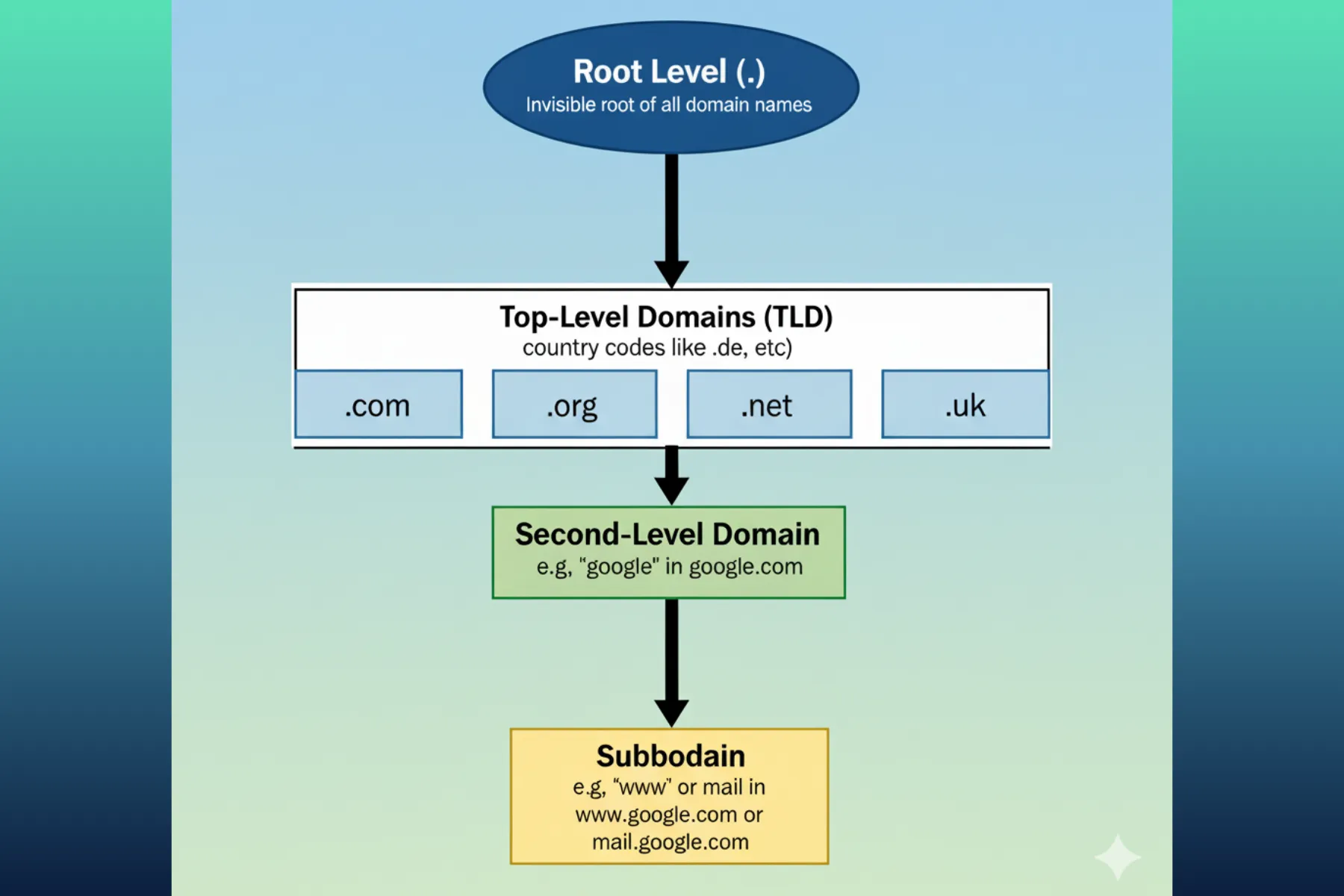
DNS follows a hierarchical structure that looks like an upside-down tree:
Root Level (.): The invisible root of all domain names
Top-Level Domains (TLD): .com, .org, .net, country codes like .uk, .de etc.
Second-Level Domains: The main domain name like "google" in google.com
Subdomains: Prefixes like "www" or "mail" in www.google.com or mail.google.com
Each domain extension is managed by its own TLD server. For example, all ".com" domains are managed by Verisign's TLD servers, ".org" by Public Interest Registry, country codes like ".in" for India is managed by NIXI, ".us" for the United States is managed by NeuStar and so on.
These TLDs can implement their own policies, pricing, and rules for domain registrations. This is why some domain extensions are more expensive or have specific restrictions compared to others. The TLDs hold the records of which authoritative name servers are responsible for each domain registered under their extension.
And finally the authoritative name servers are the ones that actually hold the DNS records for Second-Level Domains and all subdomains. These records include the IP address (A or AAAA records), mail servers (MX records), text information (TXT records) and more.
This hierarchical structure allows DNS to be scalable, distributed, and efficient. No single entity controls the entire DNS system, which also helps prevent bottlenecks and a single point of failure.
DNS Records
Let's glance at what are the things that constitute a DNS record.
In addition to the common record types, there are several advanced DNS records that serve specific purposes:
TTL (Time to Live): Every DNS record has a TTL value that determines how long the record should be cached. Lower TTL values mean faster propagation of changes but more DNS queries. Higher TTL values reduce DNS load but slower updates. When updating your DNS, you should lower the TTL value 24-48 hours in advance.
CAA (Certificate Authority Authorization): Specifies which certificate authorities can issue SSL certificates for your domain.
SRV (Service): Defines the location of services like SIP, XMPP, or other protocols.
PTR (Pointer): Used for reverse DNS lookups, mapping IP addresses back to domain names.
DNSKEY: Contains public keys used for DNSSEC.
How to Choose a Domain Registrar
When picking a registrar, aim for simple management, fair renewals, and good security. Here are the essentials, explained in plain English:
Transfer policies: Ensure you can easily transfer your domain later if need arises. Avoid registrars that make transfers difficult, expensive or time-consuming.
Security: Look for two‑factor authentication (2FA), DNSSEC support (adds a cryptographic signature to DNS to prevent tampering), registry lock (blocks unauthorized transfers), and role‑based access if teams manage domains.
Pricing: Don't get swayed by initial pricing. Look at renewal rates, transfer fees, and any hidden costs for DNS management — some registrars include advanced DNS management at extra cost.
Portability: Prefer registrars that let you export zone files, bulk edit records, and switch nameservers quickly without downtime.
DNS Hosting features: Check reviews on how easy it is to manage/update records like A, CNAME, MX, TXT, TTL etc. (please visit the previous section if you need help understanding what these things are). If you're a developer, you might also want to check for API access.
* Not relevant if your DNS hosting is separate from the registrar.
Extras: Compare different registrars, many of them may offer additional features that can be beneficial like free WHOIS privacy, SSL certificates, email forwarding, etc.
Here are some popular domain registrars known for their reliability and features:
Wide TLD selection, strong domain search, bundled business tools if needed.
Renewals can be higher than competitors; aggressive upselling during checkout — review the cart carefully; privacy/tool inclusions vary by TLD and plan.
Simple, transparent pricing and UI; straightforward DNS; easy setup with Google Workspace and common email providers. * This service earlier belonged to Google, Google sold this to Squarespace in 2023.
Fewer power‑user/bulk tools than developer‑focused registrars; smaller TLD catalog than others; limited advanced portfolio features.
Excellent DNS performance and security, great for technical users and developers.
* The pricing is at cost (no markup) — meaning you pay whatever charges directly to the registry (like Verisign for .com domains).
You must use Cloudflare's nameservers only, TLD coverage is smaller than traditional registrars; no bundled hosting/email — just pure domain + DNS workflow.
Remember, a domain registrar is just an authorised seller on behalf of TLDs accredited by ICANN. It handles your website's name registration and updates the authoritative nameservers at the TLD registry.
But it is those authoritative nameservers (or DNS Hosts) that actually hold the DNS records. Both — the registrar and the nameserver — can be the same or different entities.
Point is, if you at a later stage ever need to change your DNS records (like A or MX), you go to your DNS Host. To change the DNS Host itself, you go to your registrar.
Updating DNS Records and Changing DNS Providers
There are occasions, like when you change your web host or CDN, email provider etc. you may need to update/migrate your DNS records to a new DNS provider.
DNS migration sounds scary, but it's actually straightforward. Here's how to do it step-by-step and systematically-
Phase 1: Pre-Migration Planning (48 hours before)
Audit Current DNS Records: List all existing DNS records (A, AAAA, CNAME, MX, TXT, etc.) from your current DNS provider. You can use tools like MXToolbox or the dig command-line tool.
dig yourdomain.com ANY +noall +answer
Lower TTL Values: Reduce the TTL (Time to Live) values of your DNS records to a lower value (like 300 seconds) at least 24-48 hours before the migration. This ensures that changes propagate faster when you switch.
Email Configuration: Document your current email setup. DNS migration frequently breaks email if MX records aren't copied correctly.
Phase 2: Setup New DNS Provider
Set up your account with the new DNS provider and create a DNS zone for your domain.
Recreate all your DNS records on the new provider. Many providers offer import tools, but it's still better to cross-check everything manually.
Use tools like dig or online DNS checkers to verify records are configured correctly on the new provider before switching.
dig @new-nameserver.com yourdomain.com A
dig @new-nameserver.com yourdomain.com MX
Phase 3: Switch Nameservers
At your domain registrar, change the nameserver settings to point to your new DNS provider. This usually takes 1-24 hours. Use tools like whatsmydns.net to monitor how the changes spread globally.
Important: Do not delete your old DNS records or cancel your old DNS provider until you are sure the new setup is working correctly and fully propagated.
Test everything before cleaning up the old record- website, email, subdomains, and any third-party services.
DNS Security
DNSSEC (DNS Security Extensions)
DNSSEC adds cryptographic signatures to DNS records to ensure authenticity and integrity. It protects against DNS spoofing and cache poisoning attacks where malicious actors redirect traffic to fake websites.
While DNSSEC significantly improves security, it also increases DNS response sizes and complexity. Ensure your DNS provider properly supports DNSSEC before enabling it.
DNS Over HTTPS (DoH) and DNS Over TLS (DoT)
Traditional DNS queries are sent in plain text, making them vulnerable to eavesdropping. DoH and DoT encrypt DNS queries to improve privacy and security.
DNS over TLS (DoT): Uses TLS encryption on port 853 specifically for DNS queries. Offers strong security but is easier to detect and potentially block.
DNS over HTTPS (DoH): Encrypts DNS queries using HTTPS, making them indistinguishable from regular web traffic. Supported by major browsers and increasingly popular.
Conclusion
The Domain Name System is an important yet often overlooked infrastructure. The domain name itself remains one of the most important branding decisions you'll make. A good domain name is memorable, brandable, and gives users confidence in your business.
Understanding how DNS works, choosing the right provider, and implementing proper security measures can significantly impact your website's performance, reliability, and security.
DNS might be invisible to most users, but it's the foundation that makes everything else on the internet possible. Choose your DNS strategy wisely, monitor it actively, and keep security at the forefront of your decisions.
Frequently Asked Questions
What's the difference between a domain registrar and DNS hosting?
A domain registrar is where you purchase and renew your domain name (like example.com). DNS hosting is the service that stores your DNS records (A, MX, CNAME, etc.) and responds to DNS queries. While many registrars also offer DNS hosting, they are separate services. You can register your domain with one company and use a different company for DNS hosting.
How long does DNS propagation take?
DNS propagation typically takes 1-24 hours, but can sometimes take up to 48 hours in rare cases. The time depends on TTL values and caching by various DNS servers worldwide. You can speed up propagation by lowering your TTL values 24-48 hours before making changes.
Can I use Cloudflare for DNS even if my domain is registered elsewhere?
Yes, absolutely. You can register your domain with any registrar (like Namecheap or GoDaddy) and then change your nameservers to point to Cloudflare's DNS servers. This gives you Cloudflare's fast DNS performance and security features while keeping your domain registered wherever you prefer.
What is the difference between A and CNAME records?
An A record points a domain directly to an IP address (e.g., example.com → 93.184.216.34). A CNAME record creates an alias that points to another domain name (e.g., www.example.com → example.com). You cannot use CNAME records at the root domain level - only for subdomains.
Do I need DNSSEC?
DNSSEC adds an extra layer of security by cryptographically signing your DNS records, protecting against DNS spoofing attacks. While it's not mandatory, it's recommended for high-security applications, financial services, or sites handling sensitive data. However, it does add complexity and slightly larger DNS responses. Most small to medium websites can operate safely without it if using reputable DNS providers.
What happens if I forget to renew my domain?
Most registrars provide a grace period (typically 30-45 days) after expiration where you can still renew at the regular price. After that, domains enter a redemption period (30 days) where renewal becomes significantly more expensive. If still not renewed, the domain is released back to the public and anyone can register it. Always enable auto-renewal to prevent accidental expiration.
Should I use my web host's nameservers or a third-party DNS provider?
Using a specialized DNS provider like Cloudflare, Amazon Route 53, or Google Cloud DNS often provides better performance, more advanced features, and better DDoS protection than typical web host DNS. However, for simple websites with low traffic, your web host's DNS is usually sufficient. Consider switching to a dedicated DNS provider if you need advanced features, better uptime, or global performance optimization.
Cookie Policy
This website uses some non-essential cookies like Google Analytics and a custom visitor id for the sole purpose of analysing website traffic data. This helps me identify which pages are popular and how users interact with the site. You can choose to accept or decline the use of these cookies.